Two days of putting Jev into my world trip site
October 2 and 3: tagging 1,944 photos with Jev, and a search where you type anything and the globe flies to that stop. Drawing the lines, zero results, photos first, cost, and a deploy that only passed locally.
My world trip site redraws, on a globe, a journey through 161 stops over 330 days starting in August 2016. Every stop has its own photo album, and there are well over 1,900 photos. To find a photo you had to spin the globe and open the stops one by one.
So I decided to let people look at the journey again by what the photos show. Group the albums into themes like water, mountains, night and food; light up the stops on the globe that have a theme; and type anything, like "night train", and have the globe fly to that stop. Jev did the photo classification and the search. The previous post covers what kind of model Jev is.
Most of the work was done by Claude Code sessions split by role. A lead session kept the planning doc, a designer session drew the boards, and coding and research sessions built and measured things. Most of the numbers below are their measurements. My part was picking from the boards, using it on my phone, and pointing at what looked wrong.
Thirteen questions for 1,944 photos
First, the themes: water, mountains, desert, snow, street, architecture, food, transit, animals, golden hour, night, things and people. I decided to add people, to count indoor shots as night, and to call golden hour "햇살" (sunlight) in Korean. A writer session wrote the English question for each theme, including the edge cases. The fourteenth theme, "me", comes from the Photos app's face recognition, not Jev.
As the last post said, Jev can't see photos. So for each photo I sent text instead: the city, the address, the local time, and the description and scene labels the Photos app had written. The Photos app's descriptions were only material for classifying; the site itself only shows the theme names.
What Jev gives back is a probability between 0 and 1 for each theme. Where to draw the line was mine to decide. We ran a test on 50 photos first, and I got a contact sheet laying the photos out in order of probability, one tab per theme. Move the line and the photos above it light up while the ones below fade.
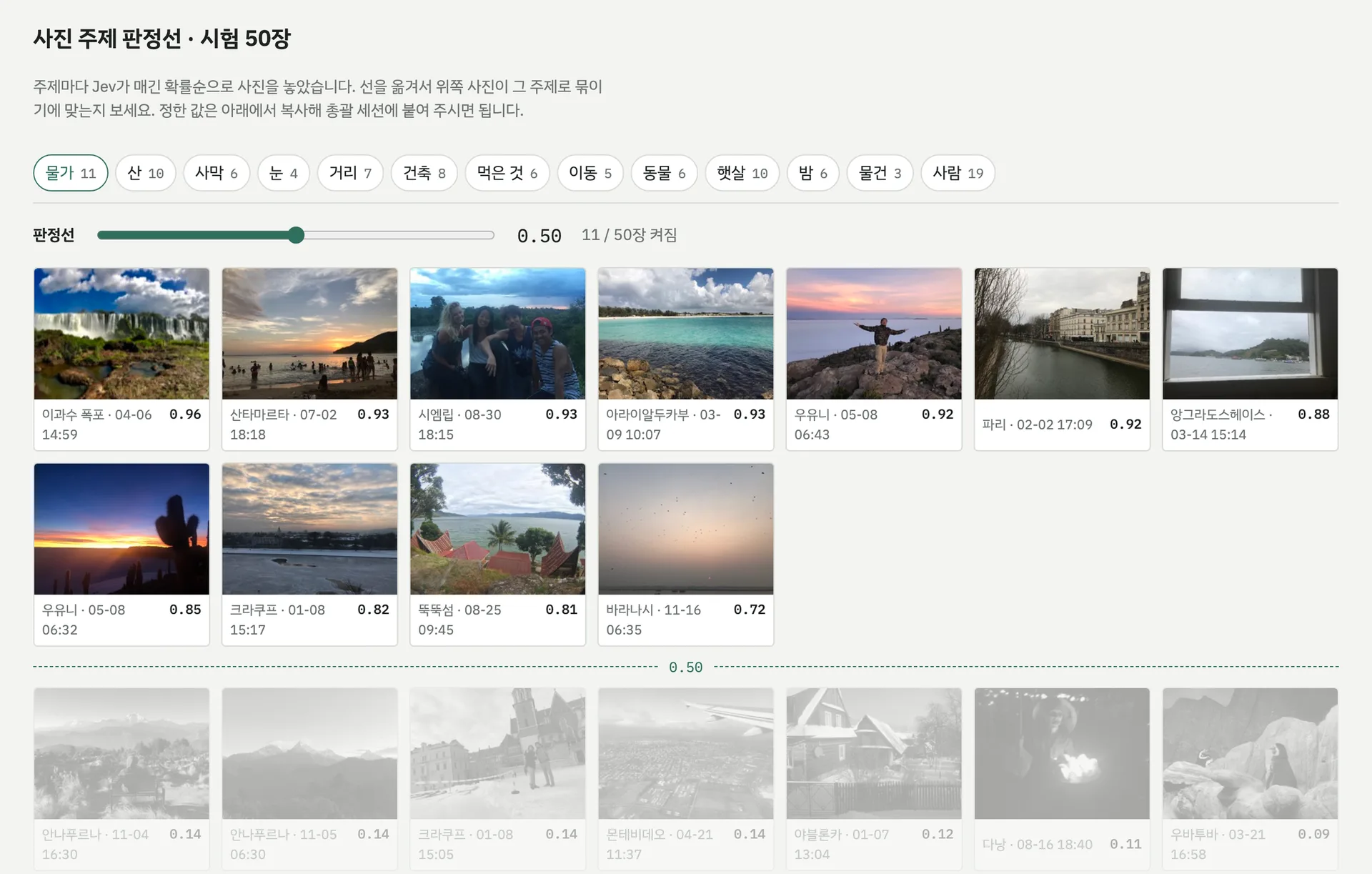
I set the lines while flipping through the sheet. Water went high at 0.75, animals at 0.90, things at 0.85; desert, architecture, food and transit stayed at 0.50. Then the remaining 1,894 photos went through in one run. There were zero errors, and the input came to 1,869,907 tokens, about $0.08. Output tokens are free, so that's the whole bill.
All the answers for the 1,944 photos are still on disk, so you can see exactly how each theme's probabilities spread. The dashed mark is the line I picked; move the slider and the number of photos that land in the theme changes with it.
Bar heights are the square root of the count. Most of the answers pile up near zero, and drawn straight the rest of the bars disappear.
The themes look quite different from one another. Animals, snow and food split cleanly into near 0 and near 1, so wherever you put the line, not much changes. People, street, golden hour and night spread wide across the middle, and nudging the line moves dozens of photos in or out. Night never goes below 0.05 for a single photo. As the last post said, I think these numbers are better read as an ordering of the photos than as the chance a photo belongs to the theme.
Search scores every stop
Search turns the setup around. For classification, one photo went in as the state and we asked thirteen theme questions. For search, what the visitor types is the state, and each of the 141 stops becomes its own question, all in a single request. Each stop gets a four-level score for how well it matches, the stops are ranked, and up to 12 at 1.5 or above are shown. A stop's question carries its city, its date, the stop's already-published story and how many photos it has per theme.
The same request carries one more noul question: is this something you'd search travel photos for? Below 0.5, the input is treated as not a search and dropped. "ㅁㄴㅇㄹ" (keyboard mash) scored 0.13, "penguin" 0.44.
The first night, the moment it went to production, this API died with a 500. More on that below.
The way in was an Easter egg
The board offered six options for where the search should start: a cursor blinking over the home ring, a field that opens when you type any letter, a blank at the start of the theme row, and so on.
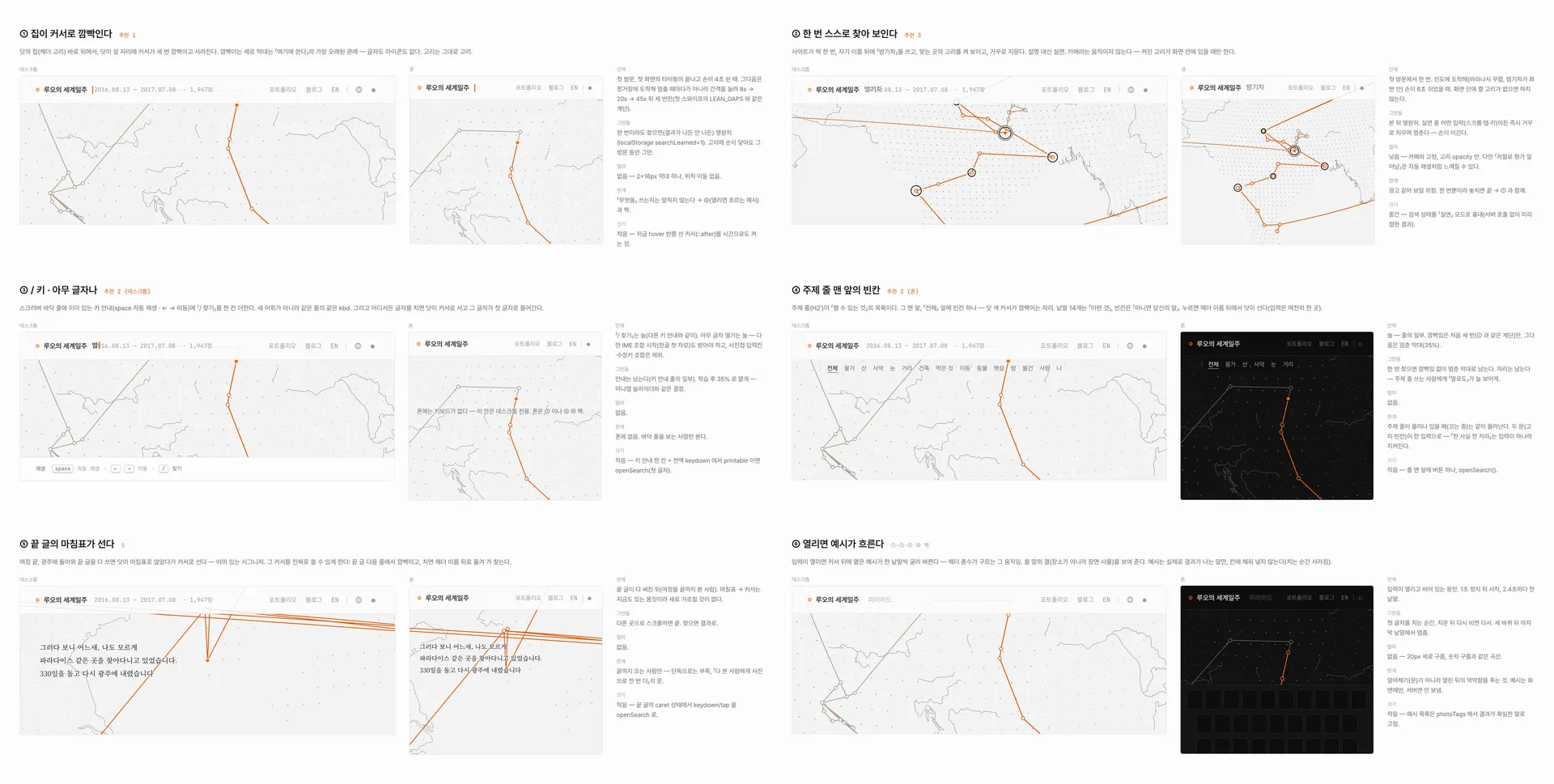
What I said after looking was "it's practically an Easter egg, how would anyone know to use it? lol". The examples were a good idea, but the placement and approach weren't. I asked for the search to sit large in the middle of the screen with everything else dimmed, so it would feel like an AI search, and said that a starting point nobody can picture is an Easter egg.
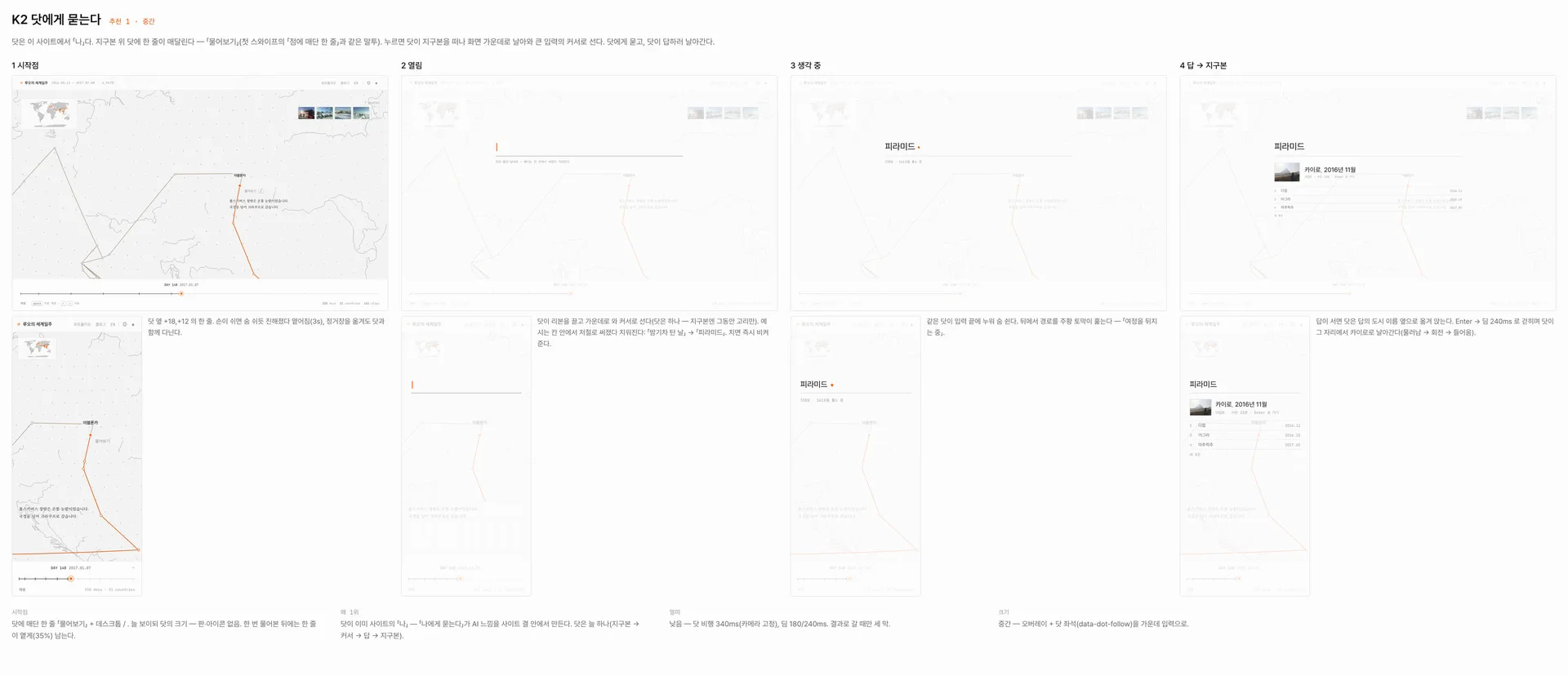
The next board brought three options, and I picked K2, "Ask the dot". The site has a single orange dot that follows wherever you're looking. "Ask" hangs beside it, and when you tap it the dot flies to the middle of the screen and becomes the cursor of a large input.
Results kept coming back empty
Once it was in, words like "개" (dog), "배고플때" (when hungry), "사고" (accident) and "여자" (woman) came back with nothing. The research session found the cause: the noul question that filters out non-searches. A single word like "dog" or "beer" only scored 0.2 to 0.3 as a search, so even when a stop matched, it was thrown out whole.
So several things changed together. A stop that matches strongly, at 1.8 or more, lets the input through even if the filter question is low. The stop summaries gained English summaries of the photo captions (text that's already public on screen). Broad words get synonyms. And when no stop matches, the nearest theme is offered instead. Putting the captions into the summaries was my call.
Some approaches were dropped. Specific synonyms, like asking about "animal" for "dog", were too loose: only 4 of the 12 animal stops actually had a dog. Just lowering the threshold was risky, because the inputs to drop and the inputs to keep sat right next to each other, around 0.21 to 0.23.
It still missed a lot. Digging again, the stop question asked "how well does this stop match", so a stop where only 1 of 30 photos matched got pushed down into the 1s. It was changed to ask "does any photo at this stop show it" instead of asking about the stop as a whole.
Measured by the research session. Afterwards about 80%, with precision 95–100%.
Run the same words again and beer went from 2 stops to 10, noodles from 0 to 8, dog from 5 to 12. It came at a price: in broad phrases like "market in the morning", "morning" counted for less.
"Shouldn't it find the photo and then show its stop?"
Looking at all that, I asked: "Isn't the logic wrong, then? Shouldn't it find the photo and show that photo's stop? Or does that make the input too big?" The point was finding photos, and looking for stops first seemed backwards.
The research session looked at two ways. One was embeddings: TypeSafe doesn't offer them, and two open models run locally (e5-small, bge-m3) were weak on searches by meaning, like "night train". The other was having Jev judge all 1,947 photos. Recall went up to 90%, but too many wrong photos came through, it cost twice as much, and it risked hitting the per-second limit. Both were dropped, and the current approach of finding stops first stayed.
Instead, it asks once more when you open an album. It takes the photos of the stops that answered and asks a noul about each one by its caption, lighting the photos that match and fading the rest. That got precision 89% and recall 92%, better than picking by overlapping caption words alone (88% and 82%). "Pyramids" picked 15 of 61 photos across two stops; "night train" picked 8 of 211, in 0.45 seconds.
"Isn't even 0.2 expensive?"
One search came to about 48 thousand input tokens, around $0.002. Seeing that, I said "wow, isn't even 0.2 expensive? This is something people will do all the time." It's a feature you'd reach for over and over while spinning the globe, so how often it gets called mattered more than the price of one call.
Four things followed. Search moved to GET, and the answer for the same words is cached at the edge for a week. The answers to the five examples shown on screen are baked ahead of time. The daily cap dropped to 100 calls per instance. And captions that repeat a stop's story, or nearly repeat each other, were trimmed from the summaries. After the trim the input is about 40,800 tokens, roughly $0.0017 per search. In production, searching the same words twice serves the second one straight from the edge cache.
It worked locally
This API went down with a 500 twice in production.
The first time was the night of October 2, on the first deploy. A function imported a JSON file without an import attribute, and on Vercel's Node ESM that fails at load time. During development the API was only ever tested through the Vite dev-server plugin, so it never showed up.
The second was the next afternoon, after the commit that cut costs. The function imported ../src/lib/queryText.ts. Node 26 on my Mac strips the types from .ts by itself, so every test passed, but in Vercel's build output that file was still sitting there as .ts. Since then, functions import nothing but JSON, and there's a test that loads the build output directly with Node's type stripping turned off.
Telling no results from an error
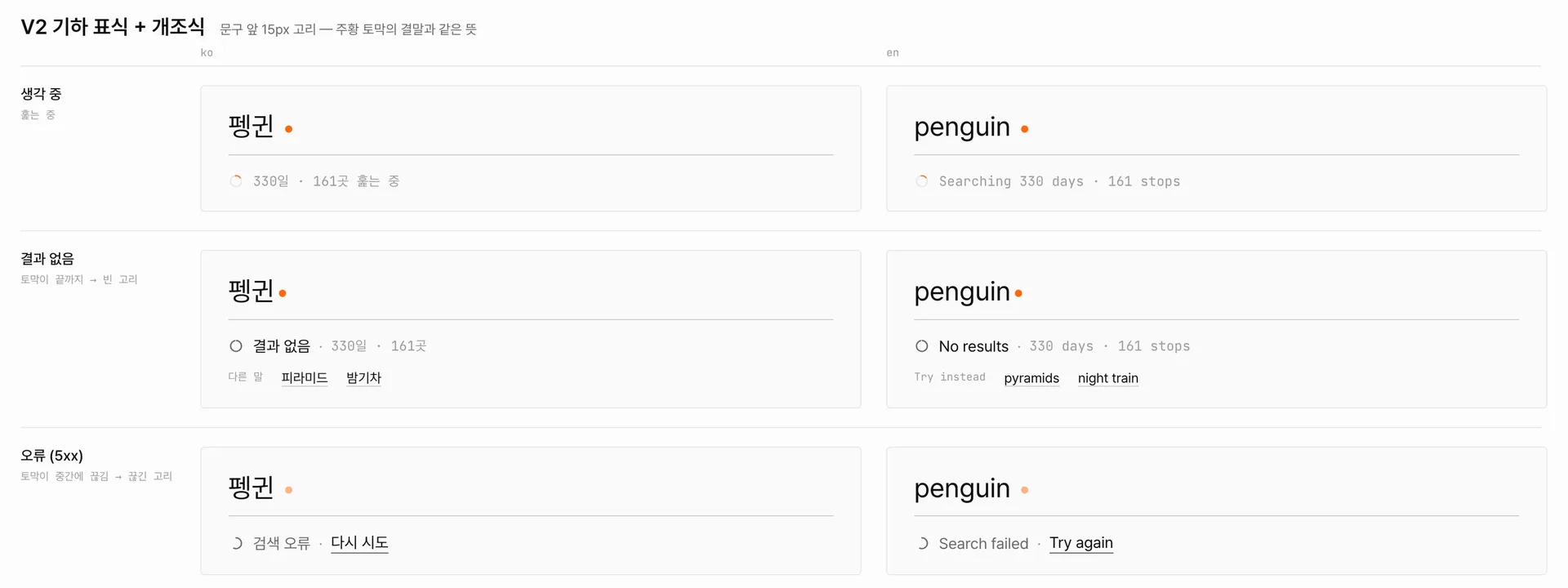
The empty screen was a problem too. "If it comes back with nothing and bounces, you can't tell whether it's a bug or not." No results and a failed search looked exactly the same.
The first proposal was a message ending in a full sentence, and I said "this is weird.. either just go with bullet-style... or show it with an icon". So a small ring now sits in front of the text and changes shape with the state: a full empty ring for no results, a broken ring for an error, a dotted ring for offline.
"사원" reads as "employee"
Some words still find nothing. "여자" (woman) and "사원" are rare even in the captions, so they get zero stops; for now they fall back to the nearest theme, people. And Jev reads "사원" not as a temple but as a company employee, which is the other meaning of the word. As the last post noted, the docs say Korean isn't handled as well as English, and I think words like this are where it shows. Translating the visitor's words into English once before asking would probably tell whether that helps.
The input limit is close too. Jev takes up to 64 thousand tokens per request; in testing, 50 thousand went through and 67 thousand was refused. The summaries are now about 41 thousand, so there's roughly 23 thousand of headroom. If the captions grow much, the stops will have to be split across two calls. And the daily cap of 100 is counted in memory per Vercel instance, so it isn't a true total. A month of watching usage in the TypeSafe console would probably show how often it really gets called.
End